In Part 1, we covered the sanitize → LLM → rehydrate pattern for text prompts. That handles the case where PII lives in your application layer, a user types something into a chat, your backend sanitizes it, sends it to GPT-4o or Claude, and rehydrates the response.
But what about PII that lives in files? Contracts, medical records, financial statements, HR documents. These are the highest-risk inputs for an LLM workflow, and they’re the ones most likely to trigger a compliance review.
This tutorial covers the document pipeline: upload a PDF or Word doc, let AmbientMeta securely remove the sensitive data, use LLMs reasoning without exposure, and get answers with real data back for complete context. One API call.
The document pipeline
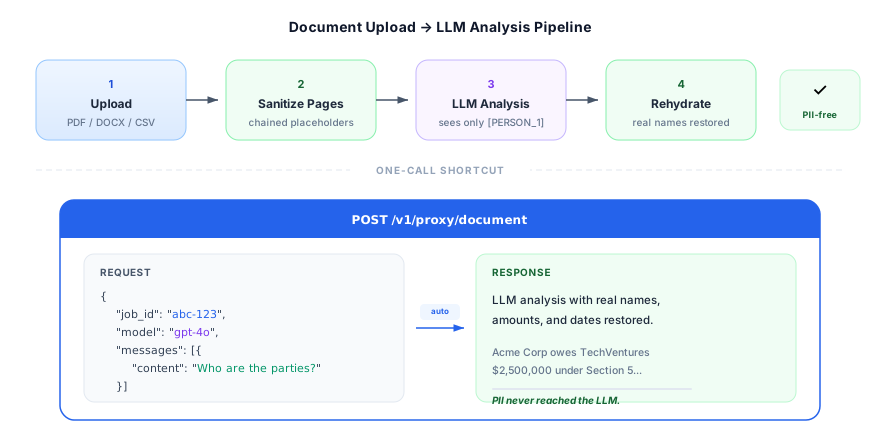
The key insight: the document’s sanitized text and the LLM query share the same session. [PERSON_1] in the document maps to the same real name as [PERSON_1] in the LLM’s response. Rehydration works across the entire pipeline.
Prerequisites
Everything from Part 1, plus your documents:
pip install litellm ambientmeta httpx python-dotenv# .env
AMBIENTMETA_API_KEY=am_live_your_key_here
OPENAI_API_KEY=sk-your-openai-keyPart 1: Upload and process a document
AmbientMeta accepts PDF, DOCX, CSV, and plain text files. The upload endpoint returns a job_id you use to track processing:
import os
import time
import httpx

API_BASE = "https://api.ambientmeta.com/v1"
HEADERS = {"X-API-Key": os.getenv("AMBIENTMETA_API_KEY")}

def upload_document(file_path: str) -> dict:
    """Upload a document and wait for processing to complete."""

    # 1. Upload
    with open(file_path, "rb") as f:
        upload_resp = httpx.post(
            f"{API_BASE}/documents/upload",
            headers=HEADERS,
            files={"file": (os.path.basename(file_path), f)},
            data={"mode": "sanitize"}
        )
    upload_resp.raise_for_status()
    job_id = upload_resp.json()["job_id"]

    # 2. Poll until processing completes (timeout after 2 minutes)
    start = time.time()
    while time.time() - start < 120:
        status_resp = httpx.get(
            f"{API_BASE}/documents/{job_id}",
            headers=HEADERS
        )
        result = status_resp.json()

        if result["status"] == "completed":
            return result  # includes job_id, session_id, total_entities
        elif result["status"] == "error":
            raise RuntimeError(f"Document processing failed: {result.get('error_message')}")

        time.sleep(2)

    raise TimeoutError(f"Document processing timed out after 120s for job {job_id}")
The document processor runs page-by-page with chained placeholders. If “Joshua Hutcherson” appears on page 1 and page 14, it’s [PERSON_1] both times. The mapping is accumulated across all pages into a single session.
Part 2: Get the sanitized text
Once processing completes, fetch the combined sanitized text:
def get_sanitized_text(job_id: str) -> dict:
    """Fetch the combined sanitized text and session_id for a processed document."""
    resp = httpx.get(
        f"{API_BASE}/documents/{job_id}/text",
        headers=HEADERS
    )
    resp.raise_for_status()
    return resp.json()  # {"sanitized_text": "...", "session_id": "ses_..."}
This returns the full sanitized document text and the session_id that maps every placeholder back to its original value. You can use this text for custom LLM workflows, search indexing, or anything else where you need sanitized content.
Part 3: Ask an LLM about the document, one call
Here’s the simplest path. The /v1/proxy/document endpoint takes a job_id, injects the sanitized document as system context, sanitizes your user query with the same mapping, forwards to the LLM, and rehydrates the response:
def ask_about_document(job_id: str, question: str, model: str = "gpt-4o") -> str:
    """Ask an LLM a question about a sanitized document. One call."""
    resp = httpx.post(
        f"{API_BASE}/proxy/document",
        headers={
            **HEADERS,
            "X-Provider-Key": os.getenv("OPENAI_API_KEY"),
            "Content-Type": "application/json",
        },
        json={
            "job_id": job_id,
            "model": model,
            "messages": [{"role": "user", "content": question}],
            "stream": False
        }
    )
    resp.raise_for_status()
    return resp.json()["choices"][0]["message"]["content"]
That’s it. The response comes back with real names, amounts, and dates restored.
Full example: AI-assisted contract review
Say you have an NDA as a PDF. You want GPT-4o to identify unusual clauses, but the document contains real party names, addresses, and financial terms.
# Upload and process
doc = upload_document("acme_nda_march2026.pdf")
print(f"Processed: {doc['total_entities']} entities detected")

# Ask questions
analysis = ask_about_document(
    job_id=doc["job_id"],
    question="Identify any unusual confidentiality clauses, unusual termination terms, or one-sided obligations.",
    model="gpt-4o"
)

print(analysis)
What the LLM receives (sanitized document context):
NON-DISCLOSURE AGREEMENT

This agreement is entered into between [ORGANIZATION_1] ("Disclosing Party")
and [ORGANIZATION_2] ("Receiving Party") on [DATE_1].

1. CONFIDENTIAL INFORMATION
[ORGANIZATION_2] agrees not to disclose any information shared by [ORGANIZATION_1]
for a period of 10 years following [DATE_1]...

5. FINANCIAL PENALTIES
In the event of breach, [ORGANIZATION_2] shall pay [MONEY_1] in liquidated damages
to [ORGANIZATION_1] within 30 days...
What you get back (rehydrated):
Several clauses warrant attention:

**Unusual confidentiality duration:** The 10-year term between Acme Corp and
TechVentures LLC significantly exceeds the industry standard of 2-3 years for
this type of agreement.

**One-sided financial penalties:** Clause 5 imposes a $2,500,000 liquidated
damages obligation on TechVentures LLC with no reciprocal obligation on Acme Corp...
Acme Corp, TechVentures LLC, and $2,500,000 all came back correctly. The LLM reasoned about the right parties and amounts. None of it reached OpenAI.
Switching to Anthropic
Same call, different model string:
analysis = ask_about_document(
    job_id=doc["job_id"],
    question="Summarize the key compensation terms and any non-compete clauses.",
    model="anthropic/claude-sonnet-4-20250514"
)
The document upload and rehydration are model-agnostic. LiteLLM handles the provider switch inside the proxy.
Multi-question sessions
For interactive Q&A over a document, the same job_id works for as many queries as you need. The session mapping persists for 24 hours:
doc = upload_document("merger_agreement_confidential.pdf")

q1 = ask_about_document(doc["job_id"], "Who are the parties to this agreement?")
q2 = ask_about_document(doc["job_id"], "What is the total consideration?")
q3 = ask_about_document(doc["job_id"], "Are there any unusual termination provisions?")

# Every answer references real party names, amounts, and dates.
# The document was uploaded and sanitized once.
Custom workflows: SDK + document text
If you need more control, custom system prompts, multi-document analysis, or RAG pipelines, use the /text endpoint to get the sanitized text and build your own LLM call:
from ambientmeta import AmbientMetaClient
from litellm import completion

client = AmbientMetaClient(api_key=os.getenv("AMBIENTMETA_API_KEY"))

# Get sanitized text from a processed document
doc_text = get_sanitized_text(job_id=doc["job_id"])

# Build a custom prompt
response = completion(
    model="gpt-4o",
    messages=[
        {
            "role": "system",
            "content": f"You are a contract review assistant. Here is the document:\n\n{doc_text['sanitized_text']}"
        },
        {
            "role": "user",
            "content": "Compare the indemnification clauses to standard market terms."
        }
    ]
)

# Rehydrate using the document's session_id
result = client.rehydrate(
    text=response.choices[0].message.content,
    session_id=doc_text["session_id"]
)

print(result.text)
LangChain integration
If you’re using LangChain, the langchain-ambientmeta package wraps the sanitize/rehydrate pattern as a chain component:
from langchain_ambientmeta import AmbientMetaPrivacyLayer
from langchain_openai import ChatOpenAI
from langchain_core.prompts import ChatPromptTemplate

privacy_layer = AmbientMetaPrivacyLayer(
    api_key=os.getenv("AMBIENTMETA_API_KEY")
)

llm = ChatOpenAI(model="gpt-4o")

prompt = ChatPromptTemplate.from_template(
    "Summarize this customer complaint: {complaint}"
)

# Privacy layer wraps the chain — sanitizes inputs, rehydrates outputs
chain = privacy_layer.wrap(prompt | llm)

result = chain.invoke({
    "complaint": "John Smith (john@acme.com) says his order #ORD-12345 never arrived."
})

print(result.content)
When to use which approach
| Scenario | Use |
|---|---|
| User pastes text into a form | client.sanitize() → LLM → client.rehydrate() |
| Structured prompt with known PII | client.sanitize() → LLM → client.rehydrate() |
| PDF / DOCX / CSV file | Document upload → /v1/proxy/document |
| Need a redacted output file | Document upload → download redacted file |
| Custom LLM pipeline over a document | Document upload → /v1/documents/{id}/text → your LLM call |
| Multi-turn chat on a document | Document upload → repeated /v1/proxy/document calls |
Document processing details
The processing pipeline handles format-specific concerns:
PDF: Text extraction with character-level bounding boxes. In redact mode, black bars are drawn over detected PII. In sanitize mode, original text is erased and blue placeholder text is inserted at the same position.
DOCX: PII spans are replaced with placeholders in paragraphs and tables, preserving document structure.
CSV: Redacted CSV preserves the original delimiter and quoting.
Plain text: Direct text replacement with placeholders.
All formats produce a redaction manifest, a JSON audit trail of every entity detected, its location, confidence score, and the placeholder it was assigned. This is the artifact your compliance team will want to see.
Next steps
- Get your free API key — 1,000 requests/month, no card required
- API docs — full endpoint reference including document endpoints
- Part 1 of this series — the core sanitize → LLM → rehydrate pattern